
|
Getting your Trinity Audio player ready...
|
For roughly a quarter century, Audacity has looked essentially the same, a functional but visually dated interface that made it feel more like a relic from the early days of Winamp than a modern piece of creative software. That finally changed this week with the release of Audacity 4.0, the free and open-source audio editor’s biggest overhaul since Version 3.0 stirred up controversy more than five years ago, and by most early accounts, this update lands considerably better with the community than that last one did.
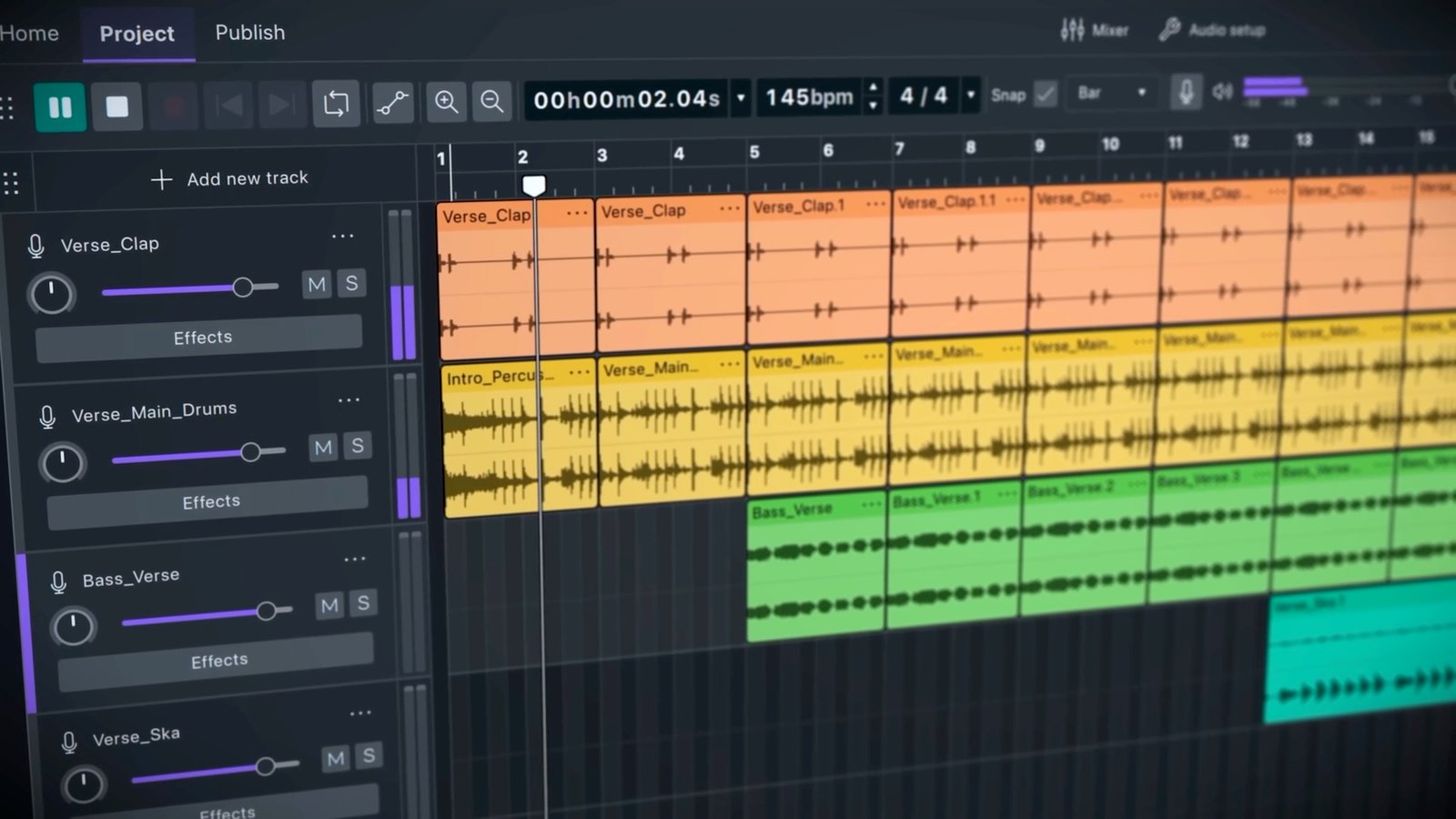
The most immediately obvious change is visual. Audacity 4.0 finally introduces a genuine dark mode, something users have requested for years, alongside a noticeably more playful and colorful overall aesthetic. Audio clips now display in color, gain sliders and other UI elements carry more vibrant accent colors, and the entire interface has been rebuilt on the Qt framework to feel like modern software rather than a program frozen in the mid-2000s. Muse Group, the company behind Audacity’s development, clearly understood that not everyone wanted to relearn a program they’ve used for years purely for the sake of a fresh coat of paint, so the classic Audacity look has been preserved as a selectable option during setup, letting longtime users skip the new design entirely if they’d rather not deal with the adjustment.
Beyond the visual refresh, the editing workflow itself has genuinely evolved. Non-destructive editing, a concept Audacity first began exploring back in Version 3.2, gets significantly expanded here. Clips can now overlap directly, with the underlying, covered-over audio revealed again if you trim back too far, a workflow that should feel intuitive to anyone who’s used more advanced digital audio workstations before. Multiple clips can be selected and trimmed simultaneously by dragging a single handle, and clips can be grouped together for more complex, multi-part edits without needing to manipulate each piece individually. Audacity also introduces a new envelope tool that will feel immediately familiar to anyone who’s used automation features inside Ableton Live or Pro Tools, letting users click to create draggable control points for adjusting gain and other parameters over time.
Organization and project management get real attention in this release too. For the first time, Audacity includes a dedicated home screen where users can browse both local projects and cloud-based projects stored on audio.com, Muse Group’s companion platform for sharing audio publicly. Projects display as visual thumbnails rather than plain filenames, making it considerably easier to identify and jump back into specific work at a glance. Alongside that home screen, a new Workspaces feature lets users build customized interface layouts tailored to specific tasks, switching between configurations optimized for podcast editing, music production, or audio restoration without manually reconfiguring toolbars and panels every time the type of work changes.
Julia Sazhina, Muse Group’s Chief Product Officer, framed the update around continuity as much as reinvention, describing Audacity’s more than 25-year history of helping creators record and edit audio and stating that the goal behind Version 4 was preparing the software for the next 25 years rather than simply modernizing it for its own sake. That framing matters given how directly it addresses the tension every major redesign of long-running software has to navigate, bringing genuinely new capability and visual polish without alienating a userbase that’s built entire workflows around the old way of doing things. Based on early hands-on impressions circulating this week, Muse Group appears to have threaded that needle reasonably well, preserving enough of the familiar structure that longtime users shouldn’t feel completely lost while still delivering what several reviewers are calling the most extensive visual redesign in the project’s history.
It’s worth being upfront about what didn’t make the cut in this initial release, since Audacity 4.0 launches as a genuinely separate application from the previous 3.7.9 branch rather than a simple in-place update. Several features from Audacity 3 remain absent for now, including Time Tracks, Note and MIDI tracks, the Mixer, the Macro Manager, and Play-at-speed functionality, along with some plugin hosting options that haven’t yet been carried over. Muse Group has said publicly that the team is working to bring these features back in future releases, but anyone relying heavily on those specific tools for existing workflows should hold off on switching over immediately, or at minimum keep the older 3.7.9 version installed alongside the new one until those gaps get addressed.
On the technical side, Audacity 4.0 continues supporting real-time effects alongside VST3, Audio Unit, and LV2 plugin formats, and the built-in effects themselves have been given refreshed interfaces while keeping their existing underlying functionality intact. The application remains available for Windows, macOS, and Linux, and critically, it’s still free and open source, a detail worth emphasizing given how much of the professional audio editing software market has drifted toward subscription pricing over the past decade. That commitment to remaining free matters enormously for the podcasters, students, YouTubers, and independent musicians who’ve come to rely on Audacity specifically because it doesn’t carry the licensing costs of paid alternatives like Adobe Audition or Logic Pro.
The tighter integration with audio.com also signals where Muse Group appears to be steering the broader Audacity ecosystem going forward, toward a more connected experience that makes sharing finished work with the public a more seamless part of the actual editing process rather than a separate export-and-upload afterthought. Whether that direction proves genuinely useful or simply adds unnecessary complexity for users who just want a straightforward local audio editor will likely become clearer as more people spend real time with the new cloud-connected workflow over the coming months.
For an application that’s remained a staple across podcasting, music production, and audio restoration for over two decades largely without a serious visual update, Audacity 4.0 represents a genuinely significant moment, one that early reviewers seem to agree lands considerably more smoothly than the last major overhaul did back in 2021. Full release notes and download links are available through Audacity’s official site. For more coverage of creative software and open-source tools, visit Business Tech.